
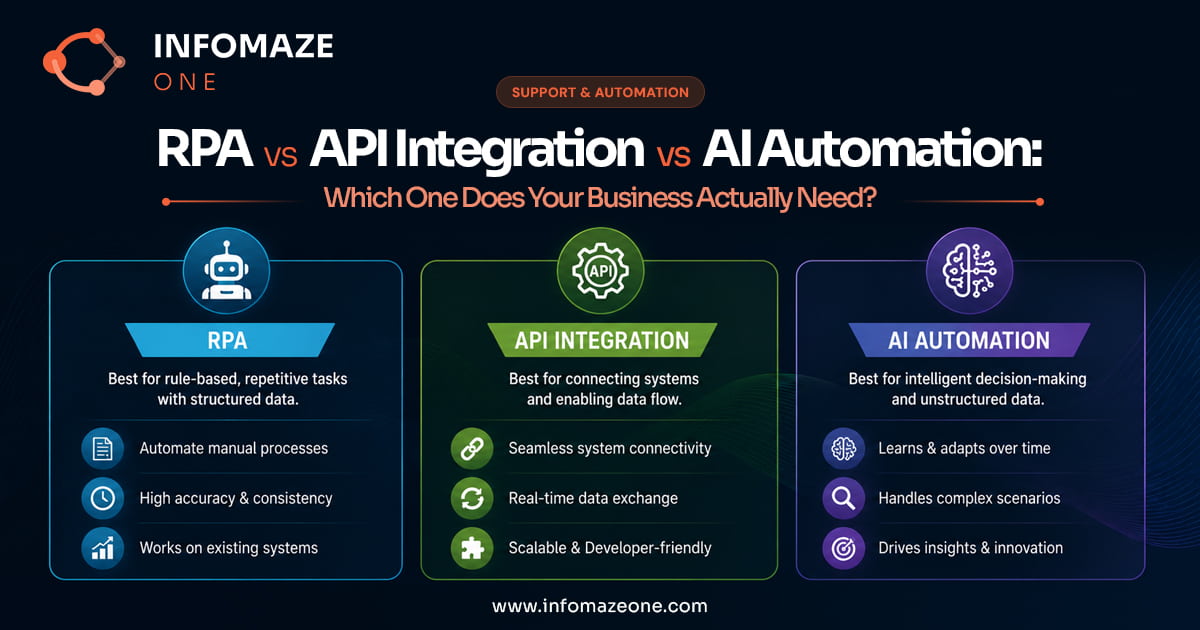
The Automation Confusion
When people talk about automating business workflows, they often use “automation” as if it describes a single category of thing. It doesn’t. Robotic Process Automation (RPA), API integration and AI-powered automation are three fundamentally different approaches to the same goal — reducing manual work — and choosing the wrong one for a given use case creates problems: workflows that break when underlying systems change, solutions that are expensive to maintain, or automation that can’t handle the variability of real-world inputs.
Understanding RPA vs API integration and AI automation — what each is best at, what it’s weakest at, and when to use each — is the foundation of a sensible automation strategy.
RPA vs API vs AI: Quick Comparison
Robotic Process Automation (RPA)
What it is
RPA uses software bots that mimic human interaction with computer systems. The bot clicks buttons, reads screens, copies and pastes data, fills in forms and navigates applications — exactly as a human would, but faster and without coffee breaks. The key characteristic is that RPA operates at the user interface level, not at the data level.
When it works well
RPA is the right choice when you need to automate interactions with a system that has no API — typically legacy software, older ERP systems, government portals, or third-party systems that weren’t built with integration in mind. If someone currently spends three hours a day logging into a system, copying data from a spreadsheet, pasting it row by row, clicking submit and logging out, RPA can eliminate those three hours without any changes to the underlying system.
When it struggles
RPA is brittle. When the underlying application changes its interface — a button moves, a form is redesigned, a new screen is added — the bot breaks. Maintaining RPA workflows requires ongoing attention when systems update, which in cloud-based software is frequent. RPA also struggles with unstructured inputs: if the data the bot needs to enter varies significantly in format, or requires judgment about what to do with exceptions, simple RPA logic fails.
Typical use cases
Data entry to legacy systems. Automated report generation from systems without export APIs. Form filling on government or regulatory portals. Screen scraping of information from systems that don’t provide data feeds.
API Integration
What it is
Application Programming Interface integration connects two systems at the data level, allowing them to exchange information directly without any user interface interaction. When your CRM automatically creates a customer record when a new order is placed in your e-commerce platform, that’s API integration. When your accounting system automatically generates an invoice when a project is marked complete in your project management tool, that’s API integration.
When it works well
In the RPA vs API integration comparison, API integration is the most robust and reliable form of automation for connecting modern software systems. It operates on structured data, is generally insensitive to interface changes in the connected systems (unless the API itself changes, which vendors manage carefully), and handles high volumes reliably. It’s also the most maintainable: a well-documented API integration can run for years with minimal attention.
When it struggles
API integration requires both systems to have APIs that expose the relevant functionality — and not all systems do. Older software, bespoke internal systems and some specialist platforms don’t provide APIs, making RPA the fallback. API integration also struggles with business logic that’s more complex than a simple data mapping: if the automation needs to make decisions based on data from multiple sources or apply judgment to exceptions, pure API integration needs additional logic layers.
Typical use cases
Synchronising data between cloud applications (CRM to accounting, e-commerce to fulfilment, HR to payroll). Triggering workflows in one system based on events in another. Building event-driven architectures where actions cascade across multiple connected systems. Most Zapier and Make automations are essentially API integrations through a no-code interface.
AI Automation
What it is
AI automation applies machine learning and large language models to process unstructured inputs, make classification decisions, extract information and handle the kind of judgment-based tasks that pure rule logic can’t handle reliably. It’s the layer that enables intelligent document processing, email classification, exception handling, and any workflow where the inputs are variable and require interpretation.
When it works well
AI automation is the right choice when the inputs to a workflow are unstructured or variable — documents in different formats, emails that need to be understood and classified, data that needs to be extracted from free-form text, decisions that require context from multiple sources. AI automation handles the messiness of real-world inputs that breaks RPA and can’t be addressed by API integration alone.
When it struggles
AI automation requires training data and ongoing quality monitoring. It’s probabilistic rather than deterministic — meaning it operates at high accuracy but not 100% accuracy, which requires a human validation layer for any use case where errors have consequences. It’s also more complex to implement than simple rule-based automation, and requires thoughtful design of the exception-handling and escalation logic.
Typical use cases
Document data extraction (invoices, contracts, forms). Email classification and routing. Customer query handling and response generation. Anomaly detection in operational data. Any workflow where the input requires understanding rather than just processing.
How They Work Together in Practice
In most real-world automation implementations, these three approaches are used together rather than in isolation. A sophisticated accounts payable automation workflow might involve:
- AI automation to read invoices in any format, extract line-item data and classify the document type
- API integration to retrieve the corresponding purchase order from the ERP, update the accounting system when the invoice is validated, and trigger the payment workflow
- RPA to log into a legacy supplier portal that doesn’t have an API, retrieve any additional documents needed, and submit the processed data back
The art of automation design is knowing which layer to apply to which part of the workflow — and avoiding the mistake of trying to use one approach for everything.
“The businesses that automate well think in terms of workflow design, not tool selection. The tool follows from the requirement, not the other way around.”
Choosing the Right Approach: RPA vs API Integration vs AI Automation
A practical decision framework for evaluating an automation use case:
Do both systems have APIs? If yes, start with API integration — it’s the most reliable. If no, consider whether RPA can bridge the gap.
Are the inputs structured and consistent? If yes, API integration or RPA may be sufficient. If no — if inputs are documents, emails, free-form text or highly variable — you need AI automation.
What happens when it fails? Every automation breaks occasionally. Design for failure: what does the exception handling look like, who gets notified, and how are edge cases resolved? This question often determines whether you need a managed service with human oversight rather than a tool you deploy and leave running.
How often do the underlying systems change? RPA-heavy automation requires more maintenance as systems update. If you’re connecting cloud SaaS tools that update frequently, API integration is more resilient.
Our Workflow Automation service designs, builds and manages end-to-end automations — using RPA, API integration and AI in the right combination for each workflow. We don’t just build automations; we operate them, monitor them and fix them when something changes.
The Bottom Line
RPA, API integration and AI automation are not competing approaches — they’re complementary tools that solve different problems. The businesses that automate most effectively are those that understand the difference, apply each approach where it’s strongest, and design workflows that combine all three where needed.
The businesses that struggle with automation tend to have chosen a tool first and then tried to make their use cases fit it — an approach that produces brittle, high-maintenance solutions that fail to deliver the expected value. Start with the workflow, understand the nature of the inputs, and then choose the right combination of tools to handle it.
Ready to automate your operations?
Book a free AI Audit — 60 minutes, no obligation, realistic ROI estimate.